Monday, February 18, 2019

Feature Spotlight: Wild Spawn Reporting

It's time again to look at a core feature of the upcoming Meowth 3.0. This time I'll be sharing the progress that has been made on the wild spawn reporting feature. This one was much simpler to develop than the new raid module, and I'm pretty happy with how it's turning out. But let's get down to the details.

What's Old

First, you can keep using the wild command exactly as you have been and it will continue to work. The only things you'll need to learn are how to take advantage of the new features. The reaction for marking yourself as "on the way" to a spawn is still there, as is the reaction for saying a wild Pokemon has despawned.

What's New

The big thing is that you're able to give Meowth a lot more detail about the wild spawn, if you choose. Here are the attributes of a wild spawn you are able to specify:
  • CP
  • IVs
  • Level
  • Moveset
  • Gender
This is in addition to being able to specify the form of the species, for the odd cases of species like Castform and Alolan forms.

In order to report attributes of a wild spawn, you must use a system that is similar to the search parameters you can use in Pokemon Go. For instance, to specify that a wild spawn has 500 CP, you can add "cp500" to your report. Because you can now include multiple terms in describing the wild spawn, this creates some ambiguity when parsing the command arguments. Specifically, where does the Pokemon end and the location begin? To handle this ambiguity, multi-word arguments describing the wild Pokemon must be enclosed in quotation marks. This is also true in the raid module, but there it's usually limited to reporting Alolan form bosses.

One thing that was a priority for me with this new feature was making sure that users weren't forced to spend a lot of time typing out the command with all the information. I didn't want users to have to wait until after catching a Pokemon to report it with all its attributes. Because of these concerns, it's also possible to add the information to a wild report after the initial command. It works like this. Let's say you spot a Combee and report it immediately. Combee's a fairly rare spawn at the moment so you want your fellow trainers to have as much time as possible to get there and catch it.
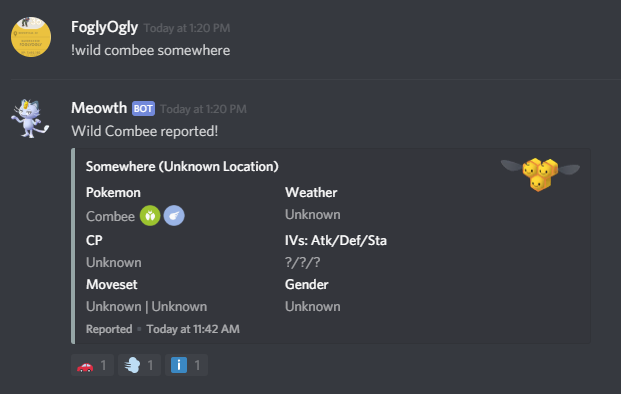

After you catch the Combee yourself, you realize it is a female Combee - making the spawn even rarer and more valuable. To add this attribute, you can hit the "information" reaction and let Meowth now the Combee is female.


Meowth helpfully provides a list of attributes you can specify along with how to set each of them. Meowth treats each "word" as a separate attribute, so it's important that you don't leave space between 'cp' and the number. Once you have replied to the message, Meowth deletes your reaction, the message prompting for information, and your reply to it, leaving only the edited wild spawn.

What Else Is Going On Behind the Scenes?

Boy am I glad you asked. There's quite a bit! Meowth is first checking that the species is even available in the wild when you report it. It's also validating the attributes when you specify them - you can't report a male Nidoran♀ for instance. If you specify level and IVs, it will calculate the CP for you. If you specify just level and CP, it will check that the CP falls within the possible CP range for that level. If you specify a moveset, Meowth checks that that moveset is available to the Pokemon. If you specify gender, Meowth checks to see if the species is one of those that has gender differences in appearance, and if it is, Meowth displays the image of the correct gender.
Meowth also takes advantage of the "gym matching" functionality, searching for gyms or Pokestops that it has in its database to provide precise directions whenever possible.

Any Bugs or Missing Functionality?

Just a bit! There's a feature that asks you to clarify if it finds multiple possible matches for a Pokemon name. This can lead to some strange results - for instance if you report a wild Pikachu, Meowth asks you to clarify if you meant Pikachu or Pichu, despite the fact that Pichu doesn't spawn in the wild. This is not really a bug per se but it is odd. Also, at the moment Meowth doesn't distinguish between legacy moves and currently available moves. So it will allow you to report a wild Dragonite with Draco Meteor for example.

I'm Super Stoked When Can I Try This Awesome Feature And When Will 3.0 Be Actually Released Also Did You Spend All of Our Money Yet

First off, wow, maybe try some punctuation. Second, no I haven't spent any of your money yet. The credit I had from Google Cloud Platform finally ran out the other day, and I'm very happy to say that you guys have been generous enough to cover Meowth's current operating costs for several months. Third, you can try the new wild feature today! There's a new channel for it in the support server. And fourth, I'm hoping 3.0 will be out no later than a month from now. I still have to write the modules for research and trades, I still have to add EX raid functionality to the raid module, I want to add a couple of general purpose server administration tools, and of course I have to make it possible to actually configure the bot for each server. I don't anticipate those being very complicated since a lot of the underlying framework is similar. And then of course 3.0 needs some actual error handling and documentation before it's released. But I believe the hardest work is over and I'm excited to get this thing to a stable release and into your servers as soon as possible. Thanks again for all your support and feedback!

Wednesday, January 16, 2019

Feature Spotlight: Raid Reporting and Coordination

The next feature I wanted to talk about is the one that's really at the core of the original design goals for Meowth: the ability to report and coordinate raids. Easily the most complex of all the functions of Meowth, this feature is now available to be tested on our support server!

Introduction

The raid system has been completely rewritten. The new system has support for a number of highly requested features, as well as some new surprises. Additionally, it will (hopefully) end up being much more efficient than the old system. Time will tell on that piece, but it certainly looks promising so far. Let's dive in.

What's new?

The following new features are present in the current build of Meowth 3.0:
  • Gym matching (with the old system of location-guessing used as a fallback)
  • Distinction between different forms of Pokemon such as Alola forms
  • Generic counters cached when raid bosses change and displayed on all raid information messages.
  • CP range displayed in the raid information
  • Recommended group size displayed in the raid information (based on Level 20 attackers)
  • Support for multiple raid groups and start times
  • Most RSVP changes can now be done with reactions in addition to commands

Gym Matching Benefits

Gym matching has brought some more benefits besides improved locations. In the last blog post I mentioned that the database stores the ID of the Level 10 S2 Cell containing each gym. Well, here's one benefit to that: we know that the in-game weather is determined at Level 10. So if a user at one gym updates the weather via the !weather command in a raid channel, the weather is also updated for each active raid in the same cell. Pretty neat!

Pokemon Forms

This is a big one and it's pretty complicated, but the short version is that if you want to report an Alolan Exeggutor raid, you will now need to put that in quotation marks. In fact this is true any time the "raid boss" argument is more than one word. The word order won't matter here, so "exeggutor alola" will work just as well as "alolan exeggutor".

Group Size Recommendations

The improved integration of Pokebattler has also made some things possible that I have long hoped to implement. Here are the details. With cached data on each raid boss, Meowth displays a recommended group size. When attempting to use !starting with an undersized group, Meowth sends a warning that you may not be able to defeat the boss. You have the option of going ahead anyway. Also, if you have asked Meowth to give your user-specific counters via Pokebattler, Meowth will take that into account when determining your group's strength. So although the recommended group size for Heatran is 3, if you and a friend have used !counters in a raid channel and Pokebattler thinks the two of you can duo the boss, Meowth won't warn you.

Additionally, if you attempt to start a group that is far above the power requirements for a certain boss, Meowth will suggest splitting into smaller groups in order to maximize rewards. Currently, this threshold is at a factor of 3 - in other words, if a group of 9 or more attempts to start, this warning will be sent. Of course, Meowth will allow you to go on ahead with the large group if you choose to.

Finally, when a group attempts to start a raid using !starting, Meowth checks to see if the users who are still on the way to the raid and the users who have not joined a group are able to defeat the boss without your group. If Meowth calculates that the number of users that you are leaving behind is not sufficient to defeat the boss, Meowth warns you about this and asks you to confirm. So in this situation, if you have a group of 5 about to do a Heatran raid, but there is 1 user that is still on the way, Meowth will warn you that you may be leaving out a user who is on the way but unable to defeat the boss without your group. You have the option of waiting or going on ahead anyway, so no need to worry about users who said they were on the way but never show up.

RSVP Changes

Most RSVP commands can now be done via reactions as well as the regular commands. If you use a reaction, Meowth will assume you are a group of 1, unless you have previously set a group size, even on a previous raid. Meowth will now remember the makeup of your group until you change it yourself. So if you always raid with the same group of people, set it once with a command and then you can use reactions from then on! Also, Meowth now enforces a limit of one raid that you are either "coming" to or "here" at. So if you said you were "here" to one raid but then say you are "coming" to a different raid, Meowth will cancel your RSVP to the first raid. This has been done to more accurately reflect the intention that "coming" is for users who are actively on the way and to help reduce the effect of people forgetting to mention when they leave a raid.

Summary

There's a lot to digest here but here's what is currently available to beta test on the support server.
  • The !raid command (no alias yet). The argument order is the same as it always has been - boss or level, location, time until hatch or expire.
  • RSVP commands and reactions (!interested, !coming, !here, !starting) as well as reactions for backing out or confirming in the case of warning messages.
  • !counters, !weather, !group (in raid channels)
Play around with it! There are quite a few bugs I'm sure but that's why this is a beta. Let me know what bugs you find and what feedback you have! As always, thanks for the support and patience.

Wednesday, December 5, 2018

Feature Spotlight: Gym Matching

This is the first in a series of blog posts where I break down a feature that is either new or improved in Meowth 3.0, providing details and insights for users and a break from coding for myself. There's no better place to start with the most-requested feature of all time for Meowth: gym matching.


Introduction


For the uninitiated, "gym matching" is what we call the process of matching a location string supplied by a user to an actual gym in our database. For a very long time, Meowth did not have a database at all because I didn't know anything about databases or how to build them. Luckily for us Scragly did a lot of invaluable work in both building a database interface and helping me learn how to use it. As a result Meowth 3.0 does have a database, and one of the tables in that database is for gyms.


Storing the Data


A description of the gyms table

Each gym in the table has, at minimum:
  • a unique ID (generated by a sequence automatically as gyms are added)
  • the gym's name in Pokemon Go (supplied by a server administrator)
  • the gym's latitude and longitude (also supplied by a server administrator)
  • the ID of the Level 10 S2 Cell containing the gym
  • the ID of the Discord server that submitted the gym (note: in the current build this can be NULL, but in the final build it will be required)
There are also currently columns for:
  • a nickname
  • a True/False value indicating whether the gym is an EX Raid Gym or not (this information will have to be included by the server administrator)

Implementation


Building a table including this information is not too difficult. But at Meowth's intended scale there are some possible problems, for instance that there are lots of gyms with the same name (e.g. "Starbucks", "First Baptist Church", and others.) Sometimes there may even be multiple gyms of the same name even in one server's playing area. However, there are lots of ways we can narrow down the list of gyms to only the relevant ones for that area when trying to find a match. One of the important pieces has to do with the reporting channel. In Meowth 3.0, every reporting channel has an associated circular region. The server administrator who configures the channel for reporting must supply a center and radius for the region. Then, when a user reports a raid in that channel, the following steps are taken:
  • Build a query of the gyms table, selecting the 'id', 'name', and 'nickname' columns.
  • Filter out all gyms added by other servers.
  • Generate a covering of Level 10 S2 Cells for the circular region associated with the channel.
  • Filter out all gyms that are not located inside the covering.
  • Retrieve the data for all of the remaining gyms.
  • Check the location argument against the nickname list.
  • If there's not a match, check it against the name list.
  • Pick the best match as judged by a fuzzymatching module.
This is the basic algorithm as it stands right now. Before release, there will be a step added that asks for clarification if there are multiple close matches.

Benefits


Under the old system of locations, Meowth had a very unsophisticated process for guessing where a gym was - take the location string, add it to the "city string" in the configuration for the channel, shove all those words in a Google Maps URL, and hope Google knows about it. This worked sometimes but not all the time - unsurprising given the relative obscurity of some landmarks. So keeping an actual gym database with saved locations is obviously going to improve the directions Meowth gives. But there are other benefits as well. For one, detecting duplicate raids is now actually possible. After determining which gym a user is reporting a raid at, Meowth checks the raids table to see if a raid has already been reported there. If there has, Meowth sends the information for the raid, including the channel it's being coordinated in.

Another benefit is that it is now possible for Meowth to make raid channels that are visible to multiple reporting regions. Raids will be visible to any reporting channel whose circular region contains any part of the gym's Level 10 S2 cell. This means that if you report a raid that is on or near the border of two channels' regions, the resulting raid channel will be visible to users from both regions.

Drawbacks


This system is highly dependent on quality data from server administrators. Since an official gym map tool does not exist, we rely on user reports and have no way of vetting the data that is put in. Because of this, each server has access only to their gyms that they have imported, and only server administrators are capable of adding or removing gyms to that list. If the data is incomplete, the results may be inconsistent. In the event that Meowth cannot find a match to the gym, it will simply fall back to the old way of creating a Google Maps search for the string.

Preparing Your Data


This is a link to a spreadsheet template you can use to gather your server's gym data. You'll need to make a copy of it to use it. When Meowth 3.0 launches, you will be able to import a CSV that matches the template to add your server's gym data in bulk. Thereafter, there will be commands for adding to, removing from, and modifying your server's gym list.

Final Thoughts


This system is not likely to change drastically between now and release. As always, I welcome all constructive feedback! Let me know what you think in the comments or in the Meowth Discord Server!

Wednesday, November 21, 2018

Meowth 3.0 - What to expect, when to expect it, and how to prepare!

Hey everyone! It's been a long time since we've talked about our plans for the next major release of the Meowth bot. I wanted to thank all of you for your patience and give an update on where things stand right now. Let's lead with the big news: I anticipate that Meowth 3.0 will be widely available by the end of January 2019! Now allow me to address some questions you might have.


What is in this version?

Well, I don't want to give everything away just yet, but I can confirm some of the big-ticket features that I think everyone will get excited about, namely:

  • Gym matching!
  • Robust support for various Pokemon attributes, including forms!
  • Lots of backend improvements! (Okay, maybe that one's just exciting for me.)


What has taken so long?

Well, two things mainly. The first thing is Real Life. The second thing is that this version is a complete rewrite of basically everything in Meowth, and as development on this version has progressed there has been a bit of feature creep and reorganization. On the backend we are finally moving to a proper database which is already proving to be very helpful in development. Hopefully, once 3.0 has been released we should be able to develop new features more quickly.

What should we do to prepare for the new version?

There's one thing in particular that you can do to prepare your server to take advantage of the new capabilities of Meowth 3.0, and it has to do with our most-requested feature: gym matching! For us to be able to match gyms for your server, we need data! We will certainly have a way to add gyms one at a time to the database once we've released, but we also want to give you some time to prepare your data so that you can start using gym matching immediately. The easiest way to format the data would be as a spreadsheet with the ability to export to a CSV file. Here's an example showing the format I'd prefer. I can't guarantee support for other file formats at this point, so if you want to be proactive, following this format is what I'd recommend. I suggest making a copy of the following Google Sheet and removing the example gyms to get started.


As there are a lot of you and not many of me, please do your best to validate the data you gather: coordinates should be precise to at least four decimal places, names should be spelled correctly, and double check that the gym displays an "EX RAID GYM" tag before entering "TRUE" in your spreadsheet.

You may notice that there is also a sheet labeled "stops" - feel free to gather data on the Pokestops in your community as well. We hope to use a similar system for research tasks!

OK I gathered all this data, now what?

Holy crap that was fast. Okay. Well, hold onto it for now. You can email it to me if you really want, but I'm hoping to have an import command ready when the bot launches so that you can send Meowth the data yourself.

Anything else?

Nope! Thanks for reading!

Changes to Research

More details on today's changes to the research command are below. A new optional argument has been added to the research command. Thi...